


FreeCell Solitaire
4.7119.00 Reviews
App Specs
- Version
- 6.9
- Updated On
- License
- Free
- Downloads
- 100,000+
- Developer
- Solitaire Card Games Inc
- Categories
- Card
- Platform
- Android
Screenshots
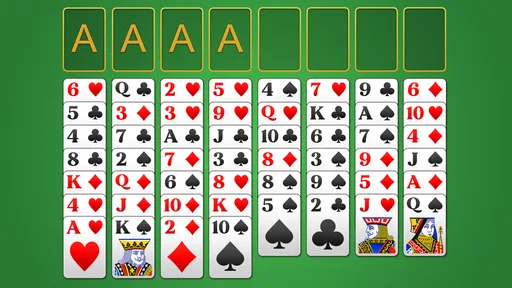
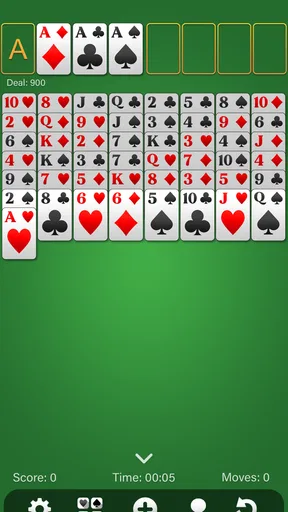
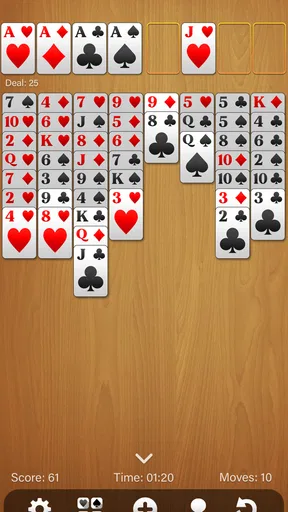
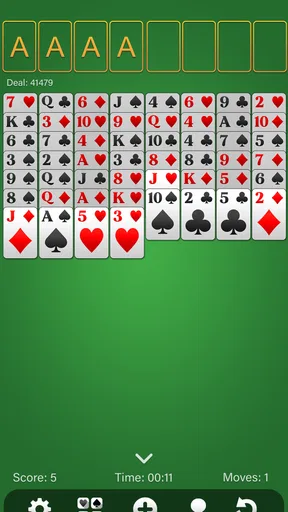
 Analysis by AppCompare
I like card games that let me begin immediately, make me think without demanding a long commitment, and give me a clean stopping point. FreeCell Solitaire fits that mood well. It is a free card game from Solitaire Card Games Inc, built around the familiar FreeCell format rather than a busy collection of unrelated distractions. I can open it, make the first move, test a plan, and either finish a satisfying deal or start again without feeling that I have entered a complicated system.
That simplicity is the main reason I would recommend it to someone who wants a relaxing solitaire game on a phone. The experience is not about fast reflexes or competing with other players. It is about reading the layout, choosing which card to uncover, and accepting that one careless move can change the entire puzzle. The game has a 4.8 average from around 5.4 thousand ratings, which matches my impression that its straightforward approach works for a lot of casual players.
How the first move sets the whole session
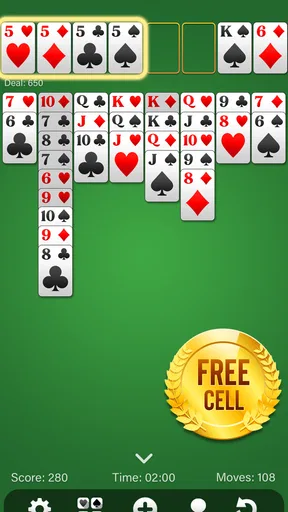
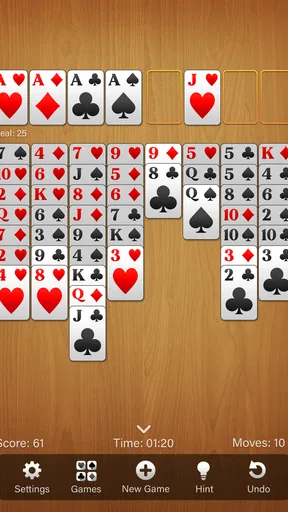
FreeCell feels different from a purely luck-driven solitaire variant because the opening action immediately asks me to think ahead. I am not simply waiting for a convenient card to appear. I look across the tableau, identify cards that can move, and decide whether freeing a lower card is more valuable than building a neat sequence somewhere else. Even the first move has consequences, because an apparently helpful placement can block the card I need a few turns later.
That makes the first few seconds more engaging than the store summary might suggest. The board is calm, but it is not passive. I have to inspect the available columns, notice which cards are buried, and use the open spaces carefully. A move that exposes a hidden card can be more important than one that immediately extends a visible run. This is one of the useful habits I developed while playing: I try to ask what the move unlocks, not only whether the move is legal.
The free cells are the central planning tool. They provide temporary storage, but treating them as unlimited parking spots is a quick way to lose control. I get better results when I reserve them for cards that will genuinely open the tableau or allow a sequence to shift. Filling every available space early may feel productive, yet it often leaves no flexibility when a longer rearrangement becomes necessary.
This is also where the game suits short breaks. I can make a single thoughtful move while waiting for a kettle to boil or during a quiet pause at work, then return to the same puzzle. The action is small, but it still feels meaningful. I am not tapping randomly to pass time; I am making a decision that changes the shape of the board.
The board rewards planning more than speed
Players coming from Klondike or other familiar solitaire games may need a brief adjustment. In those versions, the next useful card often depends heavily on what is revealed. Here, the open cells and visible tableau create more room for deliberate rearrangement. That gives me more control, but it also means I cannot blame every failed attempt on bad luck. When I lose, I can usually identify a moment where I used space too early, moved a sequence without considering its destination, or uncovered the wrong column first.
Worth Reading Before You Choose

EA SPORTS FC Mobile 26 Is a Bigger Football Game, but It Takes Time

Flipboard Shows What News Apps Must Do Beyond the Feed

Switching to Android Auto Means Rethinking Your Driving Routine

Google Calendar Makes a Crowded Week Easier to Manage

Ludo King Makes the Most of the Minutes Between Plans

Baby Panda World Brings Quick Play to Modern Phones, but Its Game Library Feels Busy
That sense of responsibility is a strength for thoughtful players and a possible weakness for anyone seeking effortless relaxation. FreeCell can be calming, but it is not always mindless. If I am tired and want cards to fall into place with minimal planning, a simpler solitaire format may feel more comfortable. This version asks for attention even when the presentation is quiet.
The developer, Solitaire Card Games Inc, keeps the identity of the game clear: this is a focused card experience rather than a large arcade package. It belongs to the card category, carries an Everyone age rating, and is suitable for the kind of casual play that does not require an elaborate introduction. The current version is 6.9, and the game supports devices using Android 7.1 or later, making it accessible on many older phones as well as newer ones.
The feedback rhythm: move, read, adjust
The most enjoyable part of a FreeCell session is the feedback loop after each action. I move a card, the tableau changes, and I immediately see whether the decision created room or reduced my options. That response is easy to understand because the board itself tells the story. A newly exposed card can open a route toward the foundations, while a crowded free-cell area warns me that I have spent too much flexibility too soon.
There is a nice rhythm between action and inspection. I do not need to wait for a timer or watch an elaborate animation before deciding what to do next. I can make a move, pause, scan the columns, and revise my plan. The reward is not always a completed stack. Sometimes it is simply discovering that a previously blocked card is now reachable. Those small improvements keep a difficult deal from feeling completely static.
I recommend playing with a deliberate scanning routine. First, I check whether an ace or another low card can move toward a foundation. Next, I look for cards that can be uncovered by shifting a short sequence. Finally, I consider whether an empty column can be created and used as a temporary staging area. This order prevents me from spending the free cells before checking the more valuable structural moves.
Another practical tip is to avoid judging a move only by the number of cards it moves. A long sequence may look impressive, but moving it can remove access to a useful card or occupy a column that could have become empty. A smaller move that reveals one buried card can be the better choice. FreeCell rewards the player who improves future options rather than the player who produces the biggest immediate rearrangement.
Why the feedback feels fair
I appreciate that the game communicates through the puzzle instead of relying on constant prompts. The visible layout becomes a kind of feedback system. If I have several legal moves but no clear progress, that is a signal to reconsider the order of play. If a column becomes empty, I know I have gained a valuable resource. If the free cells are full, I know the next decision needs to create space rather than merely continue a sequence.
This fairness makes the game useful for improving concentration in small doses. I can play slowly, compare two possible moves, and learn from the result. It is not a formal training tool, and I would not treat it as one, but the structure naturally encourages patience and visual organization. The game gives me enough information to make an informed choice without overwhelming the screen with unnecessary systems.
There is also a trade-off here. Players who want a strong sense of progression, challenges, or social competition may find the feedback too quiet. The satisfaction comes from solving the current layout, not from collecting a large set of external rewards. I would choose this app for focused solo play, not for a game night or a competitive leaderboard experience.
The reward is a solved layout, not a noisy celebration
When the foundations begin filling steadily, the reward feels earned. I can see the consequences of earlier decisions coming together: a blocked card becomes available, a sequence moves into place, and the remaining columns become easier to read. The game’s appeal is strongest at this point because the board changes from a problem into a pattern I understand.
That reward is especially satisfying after a session that looked stuck. FreeCell often gives me a reason to keep going because one useful opening can revive the entire arrangement. I may spend several minutes examining a crowded tableau, find a way to clear a column, and suddenly have the room needed to finish the remaining work. The pleasure is quiet, but it is more personal than a random win because I can connect it to the choices I made.
For an everyday scenario, I can imagine using it after dinner when I want something more engaging than scrolling but less demanding than a full game. I play one deal, pause whenever I need to think, and stop after a win or a clear dead end. That natural boundary is valuable. The app does not require me to remember a complicated story, manage a character, or keep up with other players. The entire session is contained in the cards in front of me.
The game is free to download, which makes trying it low-risk. It also includes in-app purchases priced from $3.99 to $9.99 per item. I would keep that in mind if I prefer completely purchase-free games. The free entry is helpful, but anyone sensitive to optional spending should review the purchase flow before handing the phone to a child, even though the content rating is Everyone.
Its scale also gives some context. The game has passed 100K installs, so it is not an obscure experiment, while its appeal remains fairly specific. It is a compact solitaire title, not a broad card platform. I would not install it expecting poker, multiplayer matches, or a large menu of unrelated casino-style games. Its reward comes from solving FreeCell itself.
Who gets the most from this style of reward
I think it is a strong match for people who enjoy puzzles with visible consequences. If you like arranging information, planning several moves ahead, and replaying a deal to find a better route, the structure has enough depth to stay interesting. It is also a good option for players who want a game that can be played in silence and stopped at almost any point.
I would be more cautious recommending it to someone who wants constant novelty. The basic interaction remains focused on moving cards through the tableau and foundations. That consistency is exactly why I enjoy it, but it can feel repetitive if your ideal mobile game needs new levels, characters, missions, or frequent surprises. A larger solitaire collection may be better for that player, while a competitive card game may be preferable for someone who needs opponents.
Resetting the session without losing the lesson
A failed deal is not merely a dead end; it is an invitation to examine the sequence of decisions. When I reset, I usually remember the important mistake. Perhaps I moved a useful low card too soon, filled a free cell because it was convenient, or cleared a column without having a sensible destination for the next cards. The restart feels worthwhile because the previous attempt has given me information.
This reset loop is the reason another session begins. The game is quick to understand, but a difficult layout can expose a new planning problem each time I revisit it. I am not starting over because the app has forced me into a daily reward cycle. I am starting over because I believe the board may be solvable if I change the order. That distinction keeps the experience more relaxing and less demanding than many mobile games.
My best practical advice is to reset earlier when the position has become structurally impossible rather than continuing out of stubbornness. If every free cell is occupied, the useful columns are blocked, and no move creates new space, more tapping may not improve the situation. A clean restart protects the relaxing quality of the game. On the other hand, I would not reset after one awkward move; FreeCell often looks worse before a careful rearrangement opens a route.
I also find it helpful to treat a reset as a comparison exercise. Instead of repeating the same opening automatically, I change one major decision and watch what follows. Did I uncover the left column first instead of the right? Did I preserve a free cell for a higher-value card? Did I build toward a foundation only after creating an empty column? This turns replay into learning rather than frustration.
The limitation is that this kind of self-directed improvement may not appeal to everyone. There is no need to keep playing if I do not enjoy analyzing mistakes. A more casual solitaire game with stronger luck and quicker wins can be a better choice for a player who wants immediate comfort. FreeCell asks me to participate in the solution, even when I am using it to relax.
My verdict on the complete action-to-reset loop
FreeCell Solitaire succeeds because its loop is clear: make a move, read the new layout, gain a small advantage, finish the puzzle or recognize the mistake, then decide whether another attempt is worth it. The action is simple, the feedback is visible, the reward is tied to my decisions, and the reset gives me a reason to test a different plan. That is a well-balanced structure for a quiet mobile card game.
I would recommend it to anyone looking for a focused classic card puzzle that works in short sessions but still offers meaningful decisions. It is particularly suitable for people who enjoy planning rather than pure chance and who appreciate a game that does not need a tutorial-heavy introduction. The free price makes it easy to try, while the Everyone rating broadens its appeal across casual players.
I would skip it if I wanted multiplayer competition, a large variety of card modes, or a constant stream of unlocks and events. I would also avoid expecting every session to be effortless. The game can be relaxing, but its calm surface hides a puzzle that punishes careless use of space. That is not a flaw for me; it is the feature that gives the small decisions weight.
After spending time with it, my recommendation is straightforward: install it when you want a thoughtful solitaire board rather than a noisy mobile distraction. Keep the free cells available, look for moves that uncover cards, and do not confuse a legal move with a useful one. The best reason to play again is that the next attempt can be smarter than the last.
Pros
- Classic FreeCell rules are easy to learn and suitable for all skill levels.
- Undo and hint options help players recover from difficult situations.
- Games load quickly and work well for short offline play sessions.
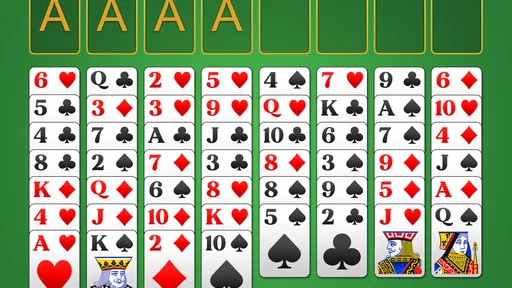
- Clean card layouts make moves easy to follow on small screens.
- Statistics and win tracking give regular players useful progress feedback.
Cons
- Some deals can feel repetitive after extended play sessions.
- Hints may reduce the challenge for experienced solitaire players.
- Ads can interrupt play
- depending on the app version and settings.
- Small cards may be harder to read on compact phone displays.
- Advanced players may miss deeper customization or tournament features.
FAQs for FreeCell Solitaire
What is FreeCell Solitaire, and how is it played?
FreeCell Solitaire is a classic card game in which the goal is to move all cards to four foundation piles, organized by suit from Ace through King. Unlike many other solitaire variations, nearly every card is visible from the beginning. You move cards between tableau columns, use four temporary free cells, and plan carefully because most deals require strategy rather than luck.
Is FreeCell Solitaire free to download and play?
Most FreeCell Solitaire apps can be downloaded and played for free, although the exact business model depends on the version you choose. Free editions may include advertisements, optional purchases, or premium upgrades that remove ads and unlock extra features. Before installing, check the store listing for pricing, subscriptions, and any in-app purchase information.
Does FreeCell Solitaire require an internet connection?
FreeCell Solitaire is generally designed to work offline, making it suitable for travel, commuting, or situations without Wi-Fi or mobile data. You can usually play standard deals and review your statistics without connecting to the internet. An internet connection may still be needed for advertisements, cloud synchronization, updates, online leaderboards, or optional features included by a particular developer.
What features should I expect in a FreeCell Solitaire app?
A well-designed FreeCell Solitaire app commonly includes multiple game deals, unlimited undo and redo options, hints, automatic card movement, an auto-complete function, and statistics such as wins, moves, and playing time. Many versions also offer customizable card faces, backgrounds, sound effects, left-handed layouts, dark mode, and accessibility settings for easier reading.
Is FreeCell Solitaire suitable for beginners and experienced players?
FreeCell Solitaire is suitable for both beginners and experienced players because the basic rules are easy to understand while successful play requires deeper planning. New players can use hints, undo moves, and simpler tutorials to learn the mechanics. Experienced users can focus on efficient solutions, challenging deals, personal records, and improving their win rate over time.


